ZeroBot Link Shortener
Create protected shortlinks with built-in anti-bot filtering
Introduction
The Link Shortener is a secure feature provided by ZeroBot that converts your URLs into protected shortlinks tied to your license key.
Each shortlink is protected by the antibot system and provides traffic filtering, analytics, and device control to ensure that only real visitors access your content.
Download Package
To begin, download the shortener package from your dashboard or directly using the link below:
Download ZeroBot ShortenerGetting Started
After downloading the package, extract it into a folder. Inside, you'll find config.php.
Configure the license
Open config.php in your preferred editor (VS Code, Notepad++). Enter your license key in the appropriate field, save, and re-compress into a .zip.
Upload to cPanel
Go to File Manager → public_html. Upload the .zip file and extract it.
https://example.com/test/Upload to Plesk
On Plesk, the structure is identical — but the main folder is httpdocs instead of public_html.
Go to Domains → choose your domain → Files → upload and extract.
Create a Shortener Key
Go to ZeroBot Dashboard → Link Shortener and create a new key.
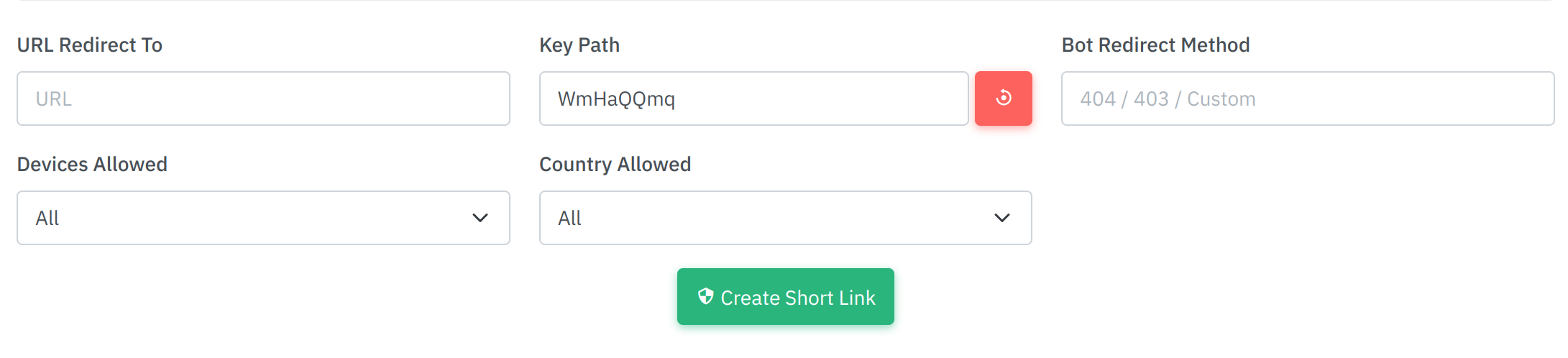
Shortener Key Options
| Feature | Explanation |
|---|---|
URL Redirect To | The target URL that visitors are redirected to. |
Key Path | A unique identifier generated for each shortlink. |
Bot Redirect Method | How ZeroBot handles bots: 404, 403, or a custom redirect. |
Devices Allowed | Limit access by device type: Mobile, Desktop, or All. |
Country Allowed | Allow or restrict access by country. |
Final Step
After generating your key (e.g. WmHaQQmq), your final link will look like:
https://example.com/test/WmHaQQmqviews.php stores your link analytics. Important
After setup, you must authorize your domain from the ZeroBot dashboard.
Thank You
Thank you for choosing ZeroBot! We appreciate your trust and commitment to a safer, smarter, and more private online experience.
If you need help, our support team is always ready to assist — just reach out via Telegram or our support center.